A medical practice may employ full-time licensed clinicians and still miss out on payments from Texas Medicaid due to inactive participation records. The provider enrollment process is what allows a medical practice to enroll in the Texas Medicaid Program. This allows physicians, group practices, hospitals, and other healthcare entities to provide treatment services to Medicaid patients and receive payment for those services.
The Texas Medicaid & Healthcare Partnership (TMHP) facilitates this process by utilizing an online system called PEMS. A physician applying for the first time, a group practice updating an existing record, and a facility returning after a lapse will each utilize PEMS; however, they will do so based upon their specific reasons.
PEMS sorts these scenarios into five primary categories: New Enrollment, Existing Enrollment, Revalidation, Reenrollment, and Maintenance. Selecting the incorrect category initially may slow down the entire process. HHSC has increased the institutional provider application fee from $730 for 2025 to $750 for 2026. Therefore, selecting the correct category initially is even more important today.
Below, we will walk through what PEMS is, help you identify which category applies to your situation as a healthcare provider, and give information on what documents you should have available prior to starting your application, and where most applicants experience difficulties.
What is PEMS in Texas Medicaid?
The term “PEMS” stands for Provider Enrollment and Management System. It is TMHP’s electronic system for monitoring providers participating in Texas Medicaid and any subsequent modifications to those providers’ information. TMHP manages the enrollment process for all providers on behalf of the Texas Health and Human Services Commission (HHSC). PEMS begins by asking for the purpose of access when you log into the site, based on whether TMHP is handling the type of request you need assistance with.
TMHP uses five main categories to determine which route the user will follow:
- “New Enrollment” creates a new entry in the database.
- “Existing Enrollment” allows users to update their current entries within the database.
- “Revalidation” involves renewing participation if the Medicaid enrollee is due for a review.
- “Re-enrollment” occurs after a provider has been disenrolled, terminated, excluded, or otherwise removed from the program.
- Small changes, such as an updated mailing address, would be submitted under “Maintenance”.
How PEMS Enrollment Works Across Different Provider Types
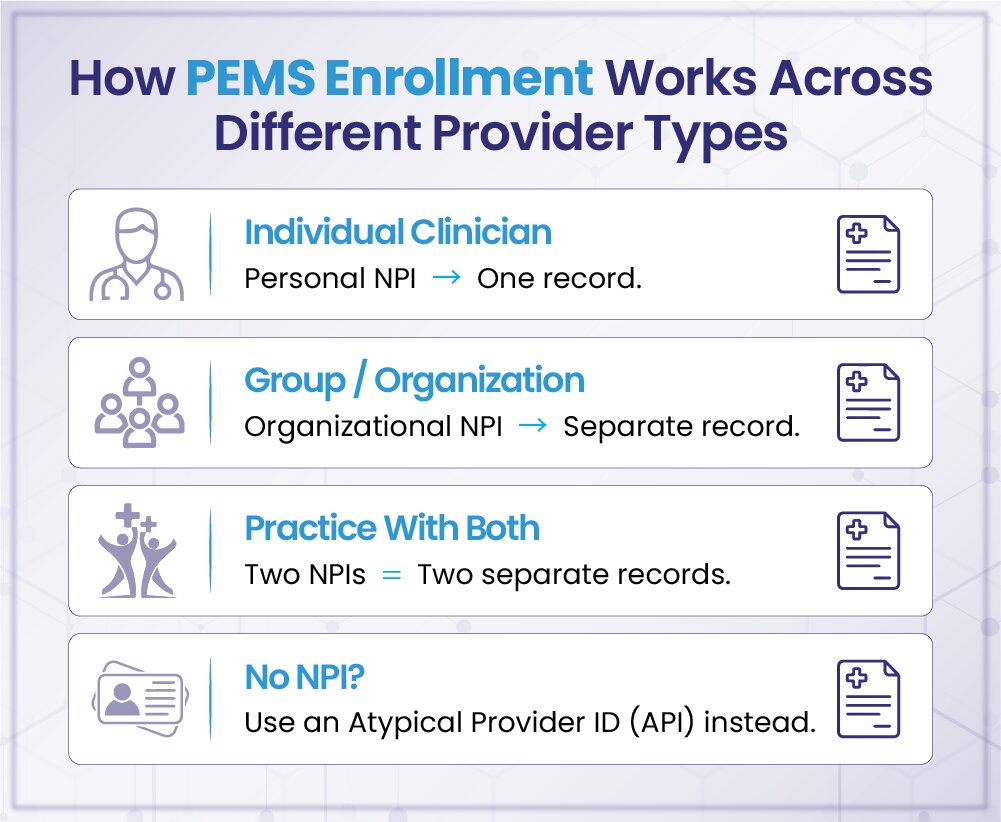
The PEMS system covers a wide range of providers. These include solo clinicians and multiple-provider groups. The PEMS program also includes large health care systems and facilities. Any other entity meeting the state’s requirements for participation is allowed to enroll. However, how your application will be processed is determined by the type of provider you are:
➜ If a provider is an individual physician or clinician, their individual NPI is used. The NPI is specifically assigned to the individual.
➜ Any type of group or organization that wants to enroll through PEMS will have its own NPI. This NPI should be separate from any individual clinicians that work for this group.
➜ A practice that operates under both an individual and an organizational NPI will need to maintain two records. Although these records are for the same practice, PEMS views each NPI as being independent of the other.
➜ Which enrollment category applies to your application depends upon what information exists for the previously listed NPIs and what changes may occur during the enrollment process. Some examples of possible scenarios include:
- Creating a new record.
- Updating an existing record.
- Re-enrollment due to an absence of participation.
In cases where no NPI has been issued to an enrolling entity, it will be identified as an “atypical provider.” An atypical provider uses an API (Atypical Provider Identifier). Therefore, the atypical provider may follow a different enrollment process than most other providers enrolled via PEMS.
Getting Ready Before Opening a PEMS Application
To begin, applicants may want to use their National Provider Identifier (NPI) because once the applicant enters their NPI number, PEMS will pull all of the applicant’s details directly from NPPES, such as name, NPI number, NPI type, whether they are a sole proprietor, and taxonomy. This may also be helpful for checking whether all of the information in PEMS matches the most recent NPPES record prior to proceeding. Otherwise, the applicant will be required to take whatever was in either their old taxonomy or old NPPES file and enter it into PEMS just as it is.
NPI and Taxonomy Details
After entering your NPI number into PEMS, PEMS will check it against all the other information you have listed on your National Plan & Provider Enumeration System (NPPES) record:
- Your NPI number
- The type of your NPI number
- Whether you are a sole proprietor
- Taxonomy
- Legal name
It may appear less important than it really is to provide accurate information initially because if there is a discrepancy at this point, it could delay the completion of your application later. It will be especially important for providers who wish to enroll as both an individual provider and as part of a group, as PEMS considers each NPI as its own separate record, regardless of whether they are both part of the same practice.
Practice and Enrollment Information
Depending on the situation, applicants may also need to provide:
- Practice location addresses
- Mailing details
- Ownership or controlling-interest information
- Tax data
Not every field applies to every applicant, so the exact requirements come down to individual circumstances rather than a fixed checklist.
Supporting Documentation
Required paperwork varies based on a few factors:
- Provider type
- Request category
- The specific program being enrolled in
A physician, a group practice, and a facility will often need different materials, so it’s best to check TMHP’s own guidance for the specific request rather than assuming a general list will cover every case.
Figuring Out Which PEMS Category Fits a Given Situation
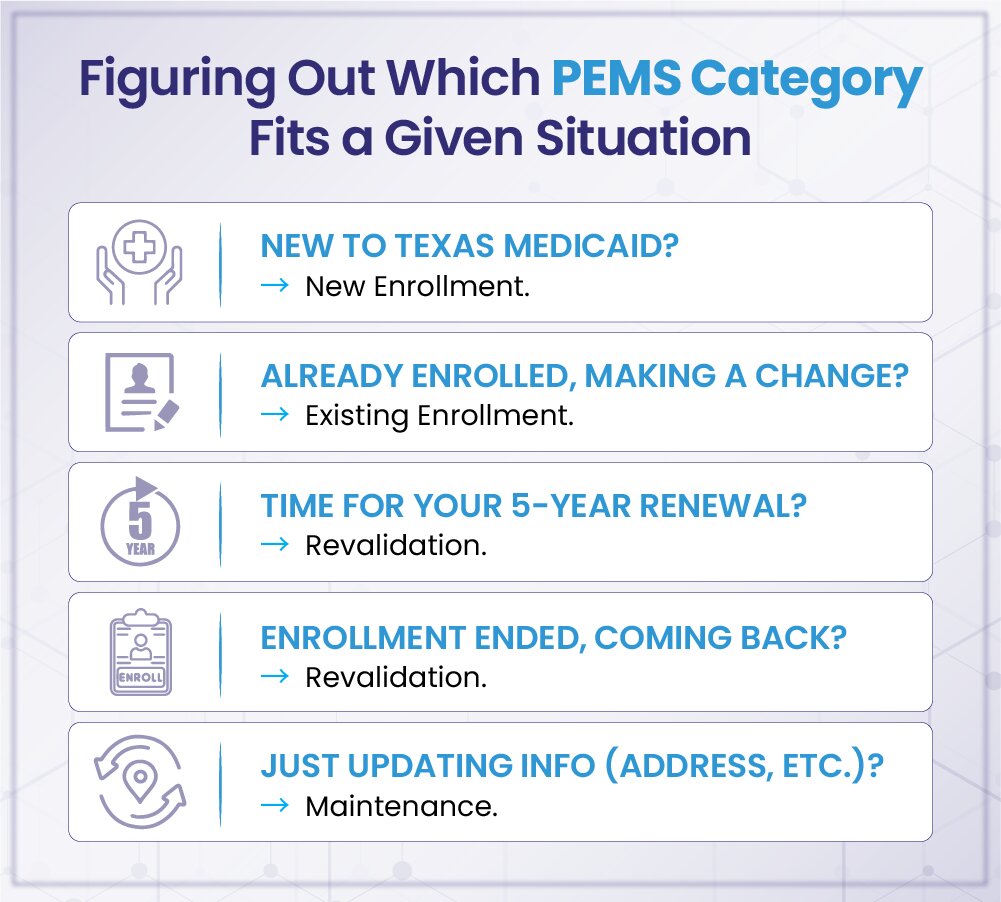
PEMS will sort each submission based upon two criteria: the current status of the Medicaid record belonging to the healthcare provider who made the request and the type of action that has been requested. Therefore, the first step would be to check the NPI or API status of this submission against its intended action. This is important because there are many differences in the way a person submits their application for services the first time versus how someone who already has a record on file with PEMS submits another service request.
New Enrollment
When filing, you can file under New Enrollment if there is no previous Texas Medicaid or other State Healthcare Program PEMS record for the provider’s NPI or API. When filing here, you will be creating a new PEMS record for the provider, and some types of changes of ownership will be filed under New Enrollment when all conditions have been met.
Existing Enrollment
You would file under Existing Enrollment if your provider NPI currently has a Texas Medicaid record and you wish to make eligible updates to their record, such as adding a new practice location, adding programs, or disenrolling from programs. There may be restrictions placed on requesting updates within certain windows of time. For example, you cannot request an update to a revalidation during a revalidation window or while a revalidation or disenrollment action is pending.
Revalidation
The Revalidation process maintains an enrolled provider’s NPI in good standing by renewing their participation on a timely basis. Each State Medicaid Agency is required by federal law to revalidate each participating provider enrollment records at least once every five years. Therefore, this is an ongoing requirement versus a one-time process.
Reenrollment
Reenrollment is used to reinstate a previously discontinued enrollment. This includes, but is not limited to, terminated, excluded, or disenrolled providers. The provider would need to go back into PEMS to complete the necessary paperwork to get reinstated in the program.
Maintenance
Maintenance makes eligible updates to information that is currently contained in an enrolled provider’s PEMS record. Maintenance does not create a new enrollment, nor will it reinstate a discontinued enrollment. It merely ensures that any information that was previously entered remains accurate over time.
The five categories described above are used by TMHP as a general guide to identify the category that best characterizes most PEMS usage. The category used will depend on the provider’s current enrollment status and the provider’s specific goals.
How to Submit a Texas Medicaid Application Through PEMS
The process of completing a Texas Medicaid enrollment application within PEMS is sequential. However, depending upon the application or associated physician records submitted, some of the screens may have different fields to complete. For someone applying for the first-time, applicants begin their journey by accessing the proper TMHP account, selecting the proper application, and reviewing the NPI data pulled from NPPES. Each subsequent screen then collects any additional required documentation and specific data relevant to that request.
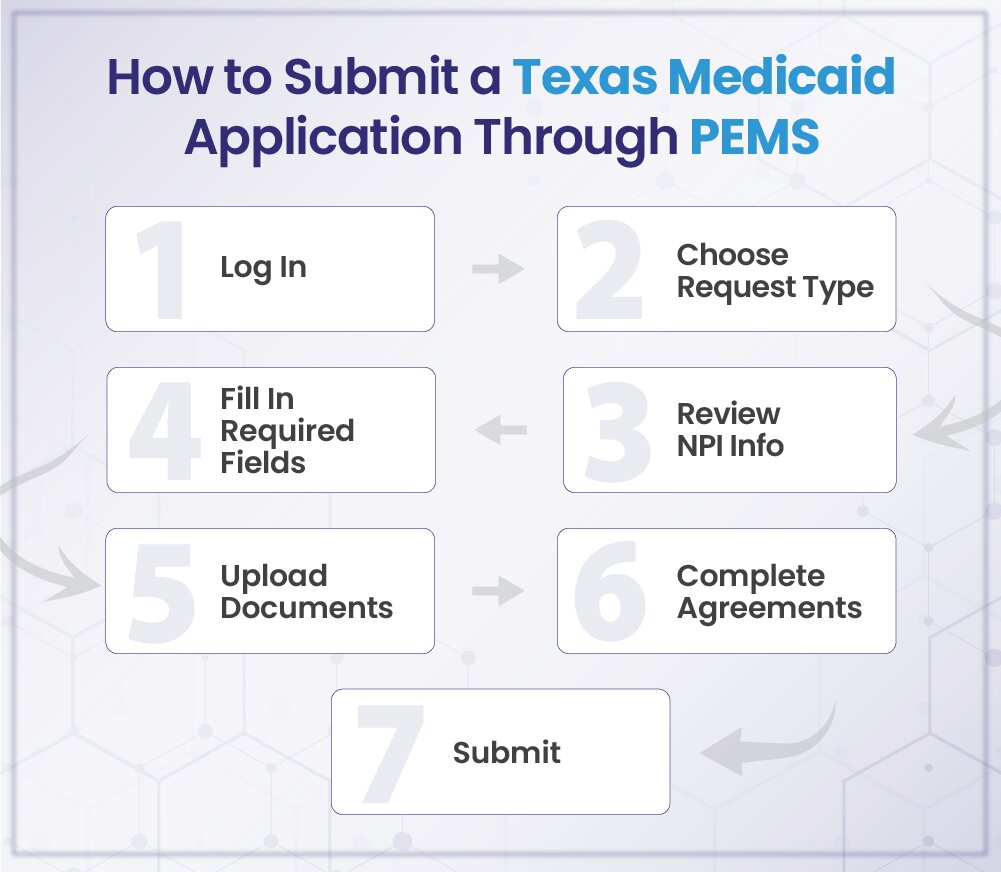
1). Log Into the TMHP Account and Launch PEMS
To begin, sign into your applicable TMHP account and open the Provider Enrollment and Management System. Upon entering the PEMS system, it will show you the available enrollment choices for either the NPI number or the API number that was previously inputted. At this point, the application moves from a generic user login entry into a specific request for enrollment.
2). Choose the Request That Matches the Record
The next step is choosing the PEMS category that matches the NPI/API’s current status and what you are asking to be changed. Since we previously went through all of the categories, this will simply be matching that framework to your specific record.
TMHP indicates that the application type selected determines how the request is going to process. If an expected option does not show on the screen, then check if there is another request related to your record currently as a draft or still processing.
3). Review the NPI Information Pulled From NPPES
When an NPI is entered into PEMS, it pulls up additional information from the National Plan and Provider Enumeration System (NPPES) for you to review. This may include information such as:
- Name of provider or organization.
- The NPI number assigned by NPPES.
- Type of NPI assigned.
- Designation as sole proprietor.
- Status of the NPPES record.
- Taxonomy.
Review all this information before continuing further. Any outdated or incorrect information will need to be corrected through the correct channels of NPPES and not adjusted manually through the Medicaid application process.
4). Fill In the Fields Tied to the Selected Request
Once you’ve verified all the NPI information, PEMS will bring up the fields associated with your selected enrollment request. All data entered into these screens must match the entity’s official records as well as the purpose of your enrollment request.
Each of these screens is unique to each of the various enrollment types; therefore, a modification to an existing enrollment can appear very different from a new enrollment. Enter each screen according to what it specifically asks.
5). Upload the Documentation PEMS Requests
PEMS identifies what documents will support a filing based on how the student is enrolling. In addition to filing one packet of documentation, there should be documentation attached that relates specifically to that student’s enrollment type.
TMHP provides additional information regarding adding attachments through PEMS and may assist if there is still some required documentation that needs to be included before your request moves forward.
6). Complete Agreements and Give the Application a Final Look
Before you submit your PEMS application, there may be agreements or certifications to complete. When you’ve completed the above steps, take another look at each item in your entire request. Check as follows:
- All of the necessary items were entered.
- All of the agreements and certifications are complete.
- The appropriate documents were attached.
This last step is where you can find and fix an error before your request gets to TMHP.
7). Send the Finished Request
Once each section, agreement, etc., has been completed, a draft may be formally submitted to TMHP via PEMS. As long as it remains a draft that has not yet been submitted, it will remain an “incomplete” draft and will not begin the formal review process by TMHP until it is finally submitted.
Upon submission of the request, you will be able to track both the status of your request and all communications from TMHP through PEMS. At this time, the request moves out of the “preparation” stage and enters an “under review” stage.
One Last Look Before Hitting Submit
Before submitting a request to TMHP, checking your request for some possible errors will save you from being delayed due to preventable errors:
- Request category lines up with the actual enrollment status of the NPI
- Details in the NPI record (name, status, and associated fields) are correct as listed in NPPES
- The taxonomy on file at NPPES is current and matches the provider
- Attachments were included and are readable
- All application fields have been filled out
- Any past deficiencies have all been cured
- There is still enough time left for your draft to be submitted before it expires after 180 days
- Your contact information (email & otherwise) is current
Reviewing this list gives a clean start for submissions once they are received by TMHP and reduces unnecessary back-and-forth once received.
A Note on Expiring Drafts: If you don’t submit your PEMS draft within 180 calendar days (TMHP PEMS application guide), it will lapse. TMHP is required to send the provider administrator an email about their impending deadline for submitting their draft 30 days prior to the expiration date. Once your PEMS draft lapses, you cannot revive it; you will have to start all over again by submitting a new request.
What is the Texas Medicaid Enrollment Fee for 2026?
Providers should never automatically think of this fee because it is not attached to all Texas Medicaid applications. The $750 (TMHP 2026 provider enrollment application fee notice) will only apply to qualifying institutional providers for 2026. For example, it was $730 for 2025. Two things determine if a provider has to pay the fee: What type of provider is submitting an application, and what exactly are they asking for?
When a qualifying institutional provider wants anything listed below, then the provider may have to pay the fee:
- Texas Medicaid or CHIP initial application enrollment
- Texas Medicaid or CHIP re-enrollment
- Texas Medicaid or CHIP revalidation
- New practice location for Texas Medicaid or CHIP
There is one major exemption. If a provider has already paid the applicable application fee to Medicare or another state’s Medicaid or CHIP program, the provider usually won’t have to make a second payment. However, the provider must submit documentation showing that the previous payment was made with their Texas application. Thus, while the $750 represents a charge associated with certain types of submissions, it does not represent a fixed amount due on each submission.
From PEMS Enrollment to Payment, Stay TMHP-Ready
While obtaining your PEMS approval is important for participating in Texas Medicaid, what happens after it matters equally as much. You need a billing process that supports sending and processing correct claims and keeping good records. More than that, each step of the way your billing process has to meet the guidelines set out by TMHP. That’s where BellMedEx’s Houston Medical Billing Team comes into play – helping Texas-based providers build a stronger revenue cycle while remaining compliant.
Explore TMHP-compliant medical billing services in Houston →
Tracking an Application: Status, Deficiencies, and What Comes Next
When you submit your PEMS application to TMHP, you have not finished enrolling; your file has now been placed in TMHP’s review process. The staff will then verify the data/records you sent them against the requirements for this provider type. In some cases, they may perform additional provider screening prior to approving your enrollment.
Understanding a Deficiency
If TMHP identifies anything that is unclear, incomplete, or lacks sufficient support, the request will either have a deficiency placed on it, or TMHP will ask for additional documentation. A deficiency or a need for additional documentation does not mean denial of the request; it simply indicates that there is an area that requires correction prior to continuing the review process.
The specific request that has been identified as having deficiencies may be located within the request dashboard by identifying the PEMS ID for said request, which will direct you to what specifically needs your attention. After correcting and submitting the request via the agreement page, TMHP will resume the review of said request. If the deficiency remains unaddressed, the request will eventually close after 165 business days in the provider’s work queue; at such time, you would need to submit a new application.
Checking Where an Application Stands
The Requests Dashboard is the best tool to see if TMHP is currently processing your application. It will show you if they have accepted your application or are just waiting for the applicant. In addition to this, PEMS will send you an email when there are new developments regarding your application, such as a deficiency alert, an approval or denial decision, and/or a welcome letter (if applicable).
When revalidating applications, an application is never complete until all open items have been cleared and the application has reached “Closed – Enrolled” status. The statuses of “Under Review”, “Awaiting Response”, and “Stalled” can occur at various times before the file reaches Closed – Enrolled status; therefore, the dashboard status is always the only thing you can rely on. Keeping the NPI administrator’s contact information up to date also helps ensure that notifications go to the correct individual.
Staying Enrolled After Approval
Approval isn’t the finish line; staying enrolled takes a bit of upkeep afterward.
Right After Approval
The NPI administrator needs to make sure that this enrollment has been activated and check that the contact information still remains accurate. The details of the practice may change at a future date. Examples include a new practice site, an update to the organization’s information, an update to tax or EFT information, or another permissible modification. These changes can be documented through an Update Request via PEMS. Keeping this current will eliminate old address information or incorrect payment information being left on file.
Revalidation: Renewing Participation on a Schedule
After an individual’s enrollment reaches its renewal date, revalidation will begin. PEMS allows the request to be opened 180 days prior to the deadline; however, simply filing on time is not sufficient; TMHP must complete its review process and achieve the Closed – Enrolled status.
- Prior to the due date (up to 180 days) — the application will be available in PEMS.
- 45-day grace period: Filing ahead of time can prevent a coverage gap if Closed – Enrolled is achieved during this window of time.
- Starting from June 16, 2026 — eligible “in flight” applications related to a qualifying due date now receive an additional 60 days.
- “In flight”: Already filed and pending approval. Drafts are not considered in flight.
Providers should reference their actual due date via PEMS instead of assuming an extended deadline. Failure to do so may result in disenrollment from Texas State Health Care Programs.
A Final Note on Getting Help With PEMS
When a question can’t be answered by the application itself, TMHP offers official support through their Provider Enrollment Help section, which provides step-by-step guides, video tutorials, and training materials, including tasks such as beginning an enrollment, uploading attachments, and resolving discrepancies.
The provider enrollment assistant tool will assist with all provider-specific enrollment issues, and TMHP provider enrollment coordinators and the TMHP Contact Center provide “hands-on” assistance. Also note, TULIP is HHSC’s separate licensure portal for long-term care facilities (such as nursing homes and assisted living) and is not part of the PEMS enrollment process.
Ultimately, enrolling through PEMS depends upon determining what category applies to you, preparing the necessary information, submitting it correctly, and maintaining control over the records generated during and after the process.
Frequently Asked Questions (FAQs)
What is TMHP, and how does it relate to Medicaid in Texas?
The TMHP (Texas Medicaid & Healthcare Partnership) manages the enrollment of providers for the State of Texas’ Medicaid Program. Providers use the PEMS (Provider Enrollment Management System) to submit, track, and follow up on their Provider Enrollment Requests.
How does a provider enroll in Texas Medicaid?
After logging on to their TMHP account as a provider, they select the request type that is appropriate to what is happening and enter either their NPI or API (to be used by providers who have an NPI but are also APIs). They will then verify that the information that was imported from NPPES is correct. The provider can then fill out whatever additional fields may be required, upload any supporting documents, and submit it for review.
What’s the quickest path to getting approved through PEMS?
Here, it is more about preparation than speed. Those providers who are able to come prepared (NPPES information, complete paperwork, correct request category) will likely avoid the typical delays of each step in this process.
How does a provider figure out which PEMS category applies?
There are only two considerations here: the student’s current status of enrollment and the reason behind their request. Whether this is creating a new file, changing an existing one, renewing it when due, or returning to the program (after a previous enrollment has been closed).
Can a provider track their application after it’s submitted?
The “Requests” dashboard on your Texas Medicaid & Healthcare Partnership (TMHP) account provides you with real-time information about where your requests are and also allows you to receive messages from TMHP regarding your request, such as alerting you to deficiencies in your application or informing you when your request has been approved.