Carelon Behavioral Health gives you 90 calendar days to file most claims. The clock starts on the date of service. For an inpatient stay, it starts on the discharge date instead. That window is shorter than many medical payers allow. And if a claim arrives late, Carelon will not pay it. So it helps to treat the deadline as a firm one.
Two numbers do most of the work here:
- First, initial claims get 90 days.
- Second, secondary claims get 60 days.
A secondary claim is one in which Carelon pays after the primary insurer. For those, the clock starts on the primary payer’s determination date, not the day you saw the patient.
Keep in mind that both numbers can shift.
The exact limit depends on the client, the health plan, and the state in which your practice bills! Some Anthem-sponsored and Medicaid plans give you longer. A few give you less.
For that reason, treat the figures below as Carelon’s standard default, not a promise about your own contract. In the end, the provider agreement you signed is the document that decides.
Before you lock a deadline into your workflow, check it against three sources:
- Your own provider agreement with Carelon
- Any state or plan-specific addendum for your market
- The member’s benefit plan documents
Carelon Timely Filing Limits for Claims
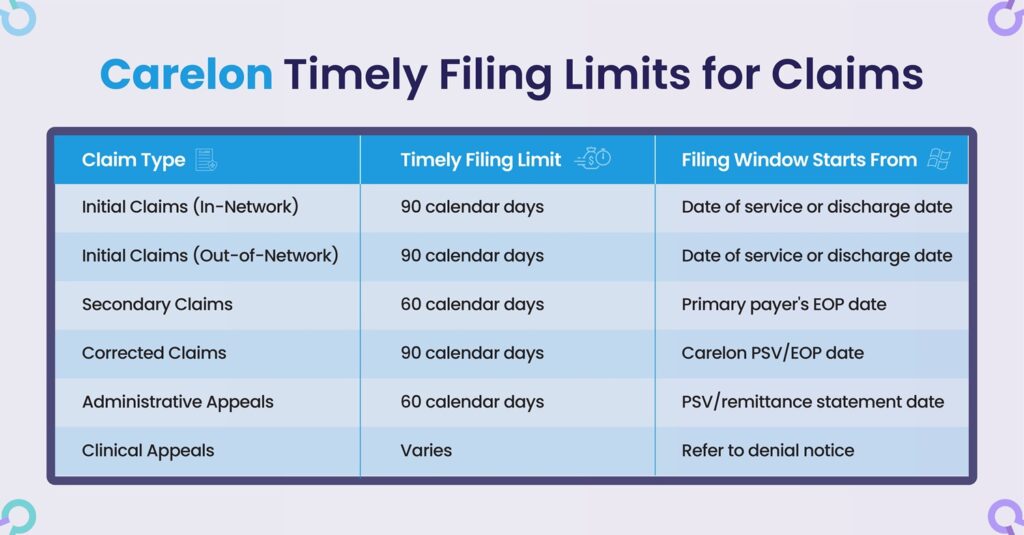
| Claim type | Timely filing limit | Window starts from |
| Initial claims (in-network) | 90 calendar days | Date of service or discharge |
| Initial claims (out-of-network) | 90 calendar days | Date of service or discharge |
| Secondary claims (Carelon secondary) | 60 calendar days | Primary payer’s determination / EOP date |
| Corrected claims | 90 calendar days | Carelon PSV / EOP date |
| Administrative (payment) appeals | 60 calendar days | PSV / remittance statement date |
| Clinical appeals | Varies (see denial notice) | Date on the denial letter |
Carelon sets a submission window for both in-network and out-of-network providers. For initial claims, the window opens on the date of service or discharge. The default length is the same 90 days for both groups. Sometimes a deadline does differ. When it does, the cause is the plan type, your provider agreement, or your state’s rules. It is not your network status alone.
Participating (in-network) providers
For in-network providers, Carelon’s published default is 90 calendar days. That period runs from the date of service, or from the discharge date on inpatient care.
Still, it pays to file early rather than wait until the window closes. Suppose you send a claim within a week or two of the visit. You then have room to fix a rejection and resend it before the 90 days run out. Remember, there is no separate, longer clock for corrected claims. So the sooner the original version goes in, the more margin you keep.
Out-of-network (non-participating) providers
The same 90-day rule covers out-of-network providers who bill for authorized services. By itself, network status does not buy you a longer window. Both in-network and out-of-network claims start from the same default. Any extension would have to be written into your own agreement.
One issue trips up out-of-network billers more than the calendar does. That issue is authorization.
Carelon requires most services to be approved before they are delivered. The usual exceptions cover emergencies and certain Medicare cases. Now suppose you treat a member without prior authorization. The claim can be denied outright, whether or not it was on time. In other words, filing inside the window does not rescue a service that was never authorized.
Secondary claims (Carelon as secondary payer)
Sometimes Carelon pays second, after another insurer has already paid first. In that case, the filing window changes shape. It opens on the date of the primary payer’s EOP, which stands for explanation of payment. So it does not open on the date of service. It is also shorter, at 60 calendar days from that determination. Because the start date depends on the primary payer’s decision, hold onto the primary Explanation of Benefits. That document acts as your proof of when the 60-day clock began.
State rules can override this too. In Pennsylvania, for example, the Medicaid program counts third-party liability claims as 90 days from the primary EOB rather than 60 days. To stay safe, confirm the coordination-of-benefits deadline for your own plan. Do not assume the 60-day figure applies everywhere.
Carelon Timely Filing Limit by State and Plan Type
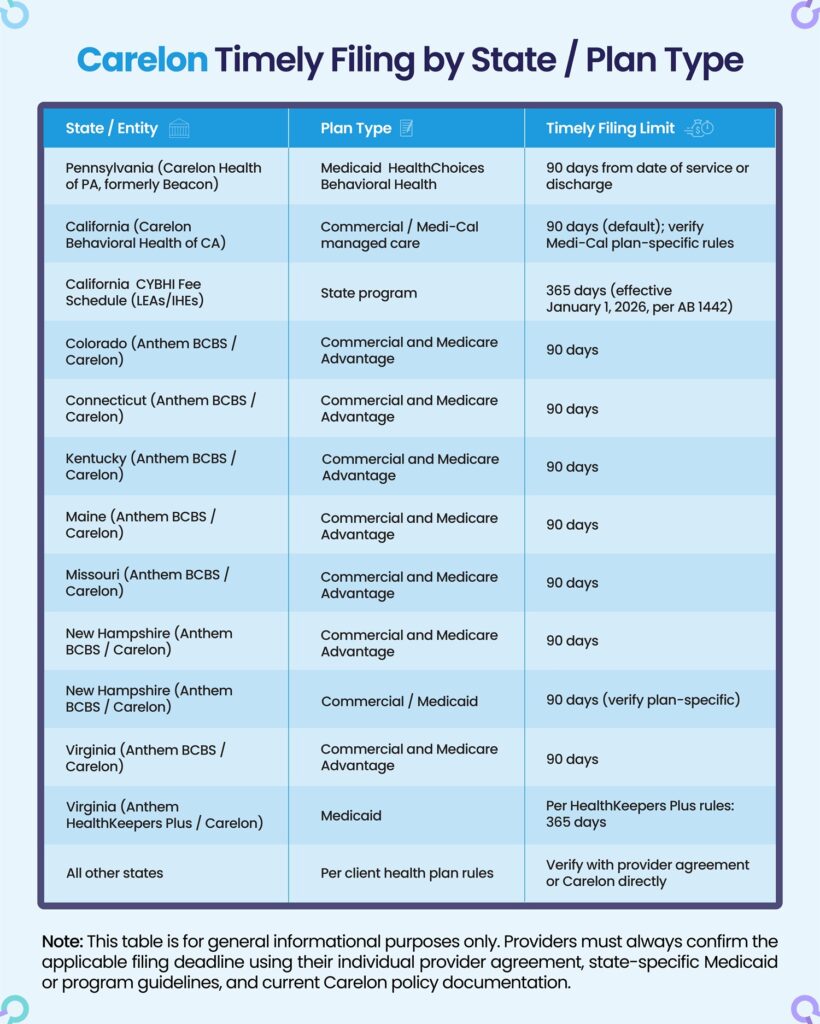
Carelon manages behavioral health benefits for many health-plan clients across the United States. That is the main reason the filing window moves around so much. The table below gives a general reference for the limits that come up most often by state and plan.
| State / entity | Plan type | Timely filing limit |
| Pennsylvania (Carelon Health of PA, formerly Beacon) | Medicaid, HealthChoices Behavioral Health | 90 days from date of service or discharge |
| California (Carelon Behavioral Health of CA) | Commercial / Medi-Cal managed care | 90 days (default); verify Medi-Cal plan-specific rules |
| California, CYBHI Fee Schedule (LEAs / IHEs) | State program | 365 days (effective Jan 1, 2026, per AB 1442) |
| Colorado (Anthem BCBS / Carelon) | Commercial and Medicare Advantage | 90 days |
| Connecticut (Anthem BCBS / Carelon) | Commercial and Medicare Advantage | 90 days |
| Kentucky (Anthem BCBS / Carelon) | Commercial and Medicare Advantage | 90 days |
| Maine (Anthem BCBS / Carelon) | Commercial and Medicare Advantage | 90 days |
| Missouri (Anthem BCBS / Carelon) | Commercial and Medicare Advantage | 90 days |
| New Hampshire (Anthem BCBS / Carelon) | Commercial and Medicare Advantage | 90 days |
| New Jersey (Wellpoint NJ / Carelon) | Commercial / Medicaid | 90 days (verify plan-specific) |
| Virginia (Anthem BCBS / Carelon) | Commercial and Medicare Advantage | 90 days |
| Virginia (Anthem HealthKeepers Plus / Carelon) | Medicaid | 365 days (per HealthKeepers Plus rules) |
| All other states | Per client health plan rules | Verify with provider agreement or Carelon directly |
Here is a 2026 change worth flagging for California school-linked providers. Under Assembly Bill 1442, the CYBHI Fee Schedule window grew from 180 days to 365 days. The change took effect on January 1, 2026, and it covers LEAs, IHEs, and affiliated providers. According to the Department of Health Care Services’ January 2026 program guidance, a claim more than 365 days past the date of service is no longer eligible for payment.
One more caution: Some Anthem-sponsored and Medicaid plans run longer than the 90-day default, and certain markets apply a 180-day limit. So do not treat a single row above as final. Always confirm each deadline against your provider agreement, the relevant state Medicaid or program guidance, and current Carelon policy.
Carelon Timely Filing Limit for Corrected (Adjusted) Claims
For corrected claims, Carelon’s window is 90 days. It runs from the date on the Provider Summary Voucher, known as the PSV, or the Explanation of Payment.
You have two ways to send one:
- Preferred: Availity Essentials, by direct data entry or EDI
- Outpatient claims: ProviderConnect’s Change/Reprocess function, for CMS-1500 and 837 Professional claims
When you submit electronically, mark the correction with the right claim frequency code. That code is Type 7, a replacement of a prior claim. Skip that step, and Carelon reads your resubmission as a duplicate and rejects it.
Carelon Timely Filing Limit for Appeals (and the Appeal Guidelines)
You must file appeals and reconsideration requests within 60 calendar days. The clock runs from the date on the Provider Summary Voucher or the claim remittance statement. Carelon splits billing-related appeals into two tracks, and the two do not share a deadline.
Here is what that means in plain terms:
➜ Say Carelon issues a Provider Summary Voucher dated March 3, and the payment looks too low to you. Your 60-day clock starts on March 3. It does not start on the day you open the mail, and it does not start on the day a staff member finally spots the problem. So in this example, you have until about May 2 to file. Suppose you send the dispute on May 20 instead. Carelon can reject it on timing alone, even when you were right about the money. For that reason, treat the date printed on the PSV as day one, and work backward from there.
➜ Now for the two tracks. The 60-day limit above covers administrative (payment) disputes, such as a wrong rate or a processing error. Clinical appeals are different. Those involve a denial based on medical necessity or level of care, and their deadline is printed on the denial letter rather than fixed at 60 days. In other words, one envelope from Carelon might give you 60 days while another gives you a different window entirely. So always read the specific notice in front of you before you assume which clock applies.
Administrative (payment) disputes
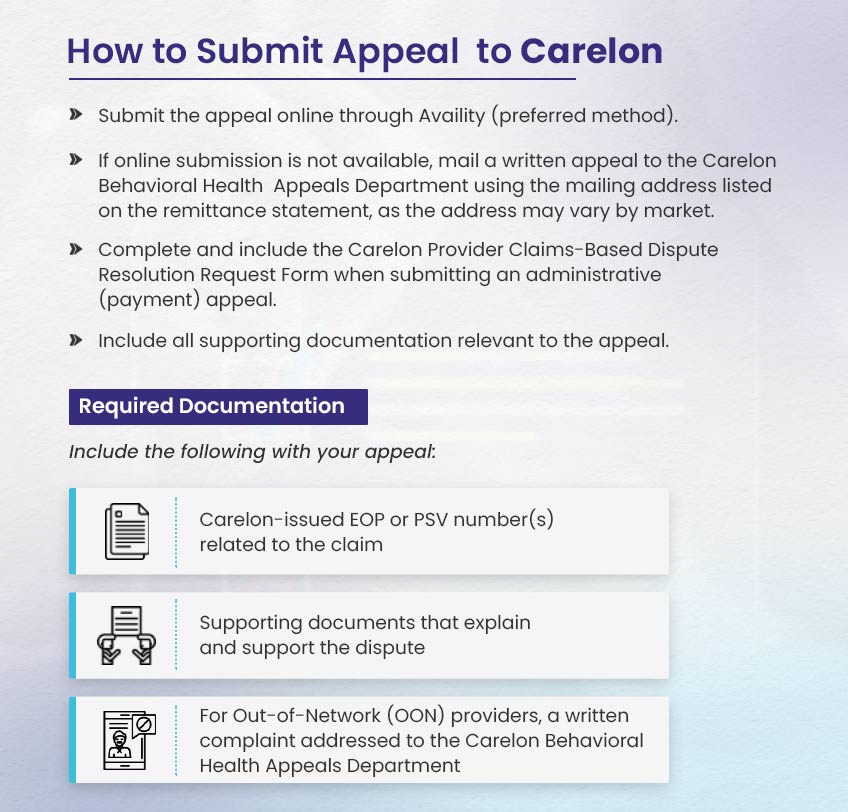
Use this track when the problem is a payment or processing error. Common examples include a wrong rate or paid amount, a claim denied for an administrative reason, or an authorization that was keyed in wrong. The standard window here is 60 days.
Here is how to submit one:
- File online through Availity, which is the preferred method.
- If you cannot file online, mail a written appeal to the Carelon Behavioral Health Appeals Department. Use the address on your remittance statement, since it can differ by market.
- Include the Carelon Provider Claims-Based Dispute Resolution Request Form
- Attach every document that supports the dispute.
Be sure to include the following as well:
- The Carelon EOP or PSV numbers tied to the claim
- Documentation that explains and supports the dispute
- For out-of-network providers, a written complaint addressed to the Appeals Department
Clinical appeals (adverse determination appeals)
This track applies when the denial rests on clinical grounds. Examples include medical necessity, level of care, or another clinical-review decision. Here, the deadline is not fixed. Instead, it is printed on the denial letter, and it can vary by the member’s plan and state. For that reason, read the letter before you do anything else, because that date governs the appeal.
Can you appeal a denial of timely filing?
Usually, the answer is no. A timely filing denial carries reason code CO-29, which means the time limit for filing has expired. Once it lands, it is hard to reverse. In certain cases, though, Carelon will consider a waiver.
➜ Requesting a waiver
When you resubmit, attach Carelon’s Timely Filing Waiver Form. A single form can cover one member, as long as all of that member’s claims go in together. You can find the forms on Carelon’s provider site, sorted by client and health plan.
What might support a waiver?
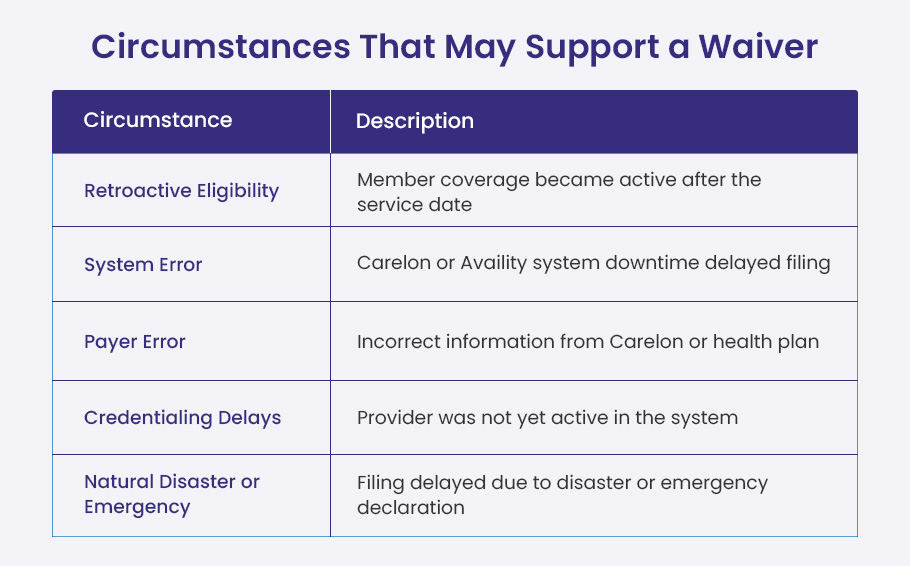
Carelon may grant a waiver when the delay was not entirely within your control. Here are the cases it tends to consider:
- Retroactive eligibility. Coverage was backdated to start after the date of service.
- System outage. Carelon’s systems or Availity had documented downtime during your filing window.
- Payer error. Carelon or the plan gave you wrong information that delayed the claim.
- Credentialing lag. You were still being credentialed and not yet active in the system.
- Disaster or emergency. A declared event genuinely blocked your submission.
Keep in mind that Carelon reviews each waiver case on a case-by-case basis. Approval is never guaranteed.
What counts as proof you filed on time?
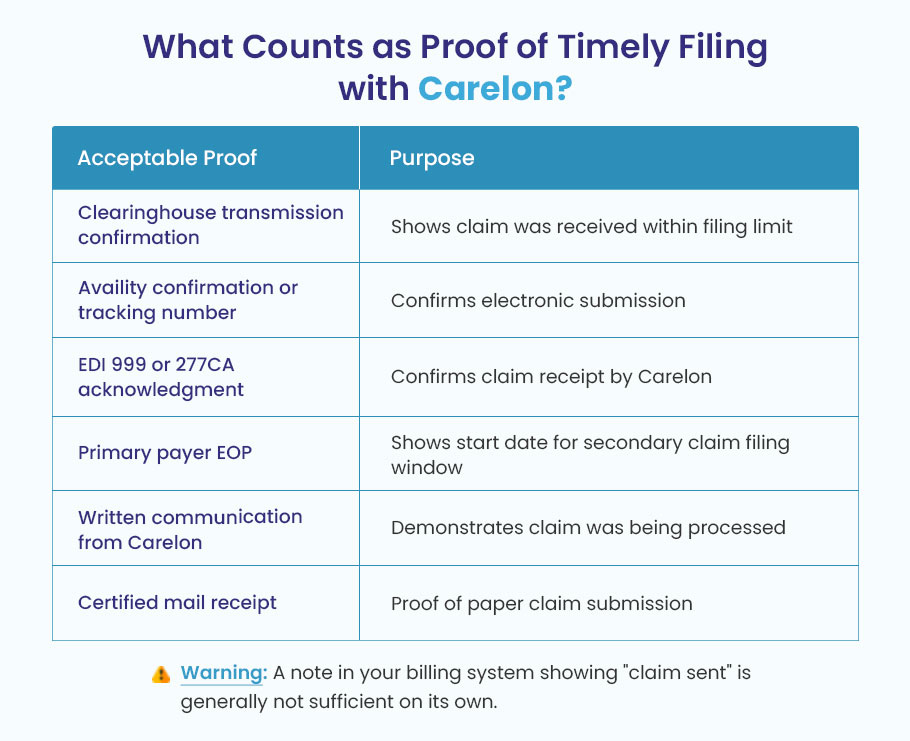
Suppose Carelon denies a claim as CO-29, but you know you filed inside the window. In that case, you will have to prove it. On its own, a note in your billing system that reads “claim sent” usually will not carry the argument. Here is the kind of proof that does work:
- A clearinghouse transmission confirmation, timestamped inside the filing window
- An Availity submission confirmation or tracking number with a date
- An EDI acknowledgment, either a 999 or a 277CA, from Carelon confirming receipt
- The primary payer’s EOP showing the determination date. For secondary claims, this fixes when your 60-day clock started.
- Written contact from Carelon during the window, such as a request for more information, which shows the claim was already in process
- A certified mail receipt, for paper submissions
Why Carelon timely filing denials happen?
The most common reason is not a missed calendar date. More often, it is a misrouted claim. To see why, it helps to know how Carelon fits into the picture.
Carelon manages behavioral health benefits on behalf of other plans. So a member’s card might say Anthem, or it might name a state Medicaid program. Meanwhile, their mental health and substance use benefits are “carved out” to Carelon. As a result, medical and behavioral health claims for the same person are routed to different places. Send a behavioral health claim to Anthem’s medical side, and it bounces. Worse still, your 90 days keep running while it bounces. A misrouted claim does not pause the clock.
With that in mind, here are the mistakes that come up again and again:
- Sending behavioral health claims to Anthem instead of Carelon. This is the single most frequent error. It is a different entity and a different destination.
- Using the wrong payer ID. Carelon’s standard EDI payer ID is BHOVO. However, some Anthem-sponsored plans use a different one. Check before you submit, since state-specific materials will tell you if another ID applies.
- No authorization on file. Carelon requires prior authorization for most higher-level behavioral health services. Without a matching authorization, the claim is denied no matter the timing.
- Missing the 60-day appeal window. Once a PSV or EOP is issued, you have 60 days to dispute it. Let that window lapse, and the denial stands.
- Resubmitting a corrected claim without flagging it as corrected. If it is unmarked, the system reads it as a duplicate and rejects it.
Disclaimer: This article is for general information only. It is not official billing or legal guidance. Filing limits, appeal rights, and submission rules change, and they vary by plan, state, and provider agreement. So check the current Carelon provider manual and your own contract or contact BellMedEx before you rely on any deadline.