In healthcare, Point of Care (POC) means that Certified Nursing Assistants (CNAs) give care and chart it right where the patient is. That spot could be the bedside, the bathroom, or an exam room. The work covers many tasks. For example, CNAs help with daily activities, take vital signs, and watch how patients act. Best of all, they record it at the very moment care happens.
This blog explains what POC means for CNAs. It also shows the key benefits and how technology is changing frontline care in long-term care. Along the way, we will cover one thing many guides skip. That is how your bedside notes connect to compliance and reimbursement.
What does “Point of Care” (POC) mean for CNAs?
Point of Care (POC) is the time and place where care is given. Most often, that means an exam room, a bathroom, or the patient’s bedside.
For Certified Nursing Assistants (CNAs), the point of care is the heart of the job. This is where the CNA handles the most basic Activities of Daily Living (ADLs). For instance, they help with bathing, dressing, and moving around. Just as important, the CNA is the main person watching each patient’s health.
CNAs take vital signs, note the patient’s pain level, and flag any change in how a patient thinks or acts. In this way, the CNA links the patient to the rest of the care team. In short, the point of care is where the team’s information starts.
To see how POC supports CNAs, we can split it into three parts.
1). Point of Care (POC) Technology
POC technology means the digital tools that CNAs use to chart and work in the same place where they meet patients. The bedside is a good example.
Common POC tools include the following:
- Tablets
- Smartphones
- Wall-mounted kiosk systems
- Mobile apps linked to the electronic health record (EHR)
The goal of these tools is speed. CNAs can enter data right away. They no longer wait to reach a central lab or a fixed computer. As a result, providers can diagnose and treat patients faster.

Example of How POC Technology Helps:
In the past, CNAs often used memory or scraps of paper to track care. Then they typed it into the EHR later, once they got back to a fixed computer. Too often, that meant care was charted in a vague way. Sometimes it was missed for good. Today, modern POC tools fix this. CNAs can chart care in real time at the bedside on tablets and wall-mounted kiosks.
2). Point of Care (POC) Charting
POC charting means you record care in real time. You do it at the exact moment and place where the care was given.
In the past, CNAs saw charting as a chore to finish at the end of a shift. Today, by contrast, they use apps that log each action as part of the task. As a result, CNAs can record vital signs, hygiene help, and intake and output at the exact time of care.
Example of POC Charting:
A CNA can check a patient’s identity, record vital signs, spot a skin problem, and alert a nurse to a concern. What is more, they can do all of this in the POC app before they ever leave the room.
3). Point of Care (POC) Testing
POC testing means you run simple tests near the patient. The bedside is one example. So there is no need to ship a sample far away.
Many settings ask CNAs to do bedside glucose tests, urine dipsticks, or other quick checks. A POC system lets these devices talk to the electronic health record (EHR). Once a test is done, the system sends the result to the EHR on its own. Or the CNA enters it at the bedside right away. Either way, results stay accurate. Just as important, providers get the data they need to make fast, life-saving calls.
Example of How POC Testing Helps:
Before POC testing, a resident with signs of a urinary tract infection (UTI) often had to wait. Lab results could take about 24 hours. Meanwhile, the patient kept hurting, and treatment was delayed.
Today, the picture looks very different. A CNA can help a resident with a urine dipstick test at the bedside. The strip is read on the spot. Next, a positive result goes to the EHR. The physician then reviews it and prescribes medicine for the UTI within minutes.
How POC Charting Connects to Compliance and Reimbursement
Here is the part many CNA guides leave out. It matters more than ever in 2026. What you chart at the bedside does not just describe care. It also helps decide how a facility gets paid and how it does on surveys.
In short, the saying on the floor is true. If it was not charted, it did not happen.
In a skilled nursing facility (SNF), the ADLs you record feed into the resident’s Minimum Data Set (MDS). The MDS is the standard form that Medicare and Medicaid use. In turn, the MDS drives the Patient-Driven Payment Model (PDPM). The PDPM sets the daily Medicare rate. So when your notes show how much help a resident truly needs, the facility is paid for the right level of care. When notes are missing or unclear, the facility may be paid for less care than it gave.
One update belongs here, because it is a common source of old information. The old Section G of the MDS 3.0 once captured ADL function. However, it was retired on October 1, 2023. In its place came Section GG. Section GG uses self-care items (GG0130) and mobility items (GG0170) to help classify residents and set PDPM payment. CNAs do not code the MDS themselves. That is the MDS coordinator’s job. Even so, the daily ADL entries CNAs make at the point of care are the proof those coordinators rely on.
The same idea holds in other care settings:
- Home health. Medicare pays under the Patient-Driven Groupings Model (PDGM). Weak visit notes can lower the payment for a full 30-day episode.
- Medicaid and personal care. Many states now require Electronic Visit Verification (EVV). It matches a CNA’s recorded start and end times against the approved hours.
The takeaway is simple. Accurate, real-time POC charting protects the patient. It supports the care team. Above all, it keeps the facility’s records and reimbursement on solid ground.
Benefits of Point of Care (POC) CNA Technology
A tablet at the bedside can do a lot more than replace paper notes. For one, it gives a CNA more time for each patient. It also improves the patient’s experience. The main benefits include the following.
1). More Time for Patients, Less Time Walking
In the past, a CNA had to leave the bedside and walk to a computer room to chart. Often, several nurses and CNAs stood in line for one computer.
With POC, the CNA carries that “computer” along. As a result, there is no more back-and-forth to a chart room. That saved time goes straight back to patient care.
2). No More Guesswork
A CNA who writes a detail hours later may forget it or get it wrong. POC charting fixes this. CNAs record details right away. Therefore, the record shows exactly what happened. It is no longer a guess based on memory.
3). Stronger Protection for Patient Information
Paper notebooks can be lost, misplaced, or seen by the wrong person. A modern POC tablet is far more secure. Much like a banking app, it needs a username and password to open. So it helps protect patient information and supports rules such as HIPAA.
4). Patients Feel Heard
Patients feel heard when they see the CNA chart their concerns on the spot. Families feel calmer for the same reason. Instead of hoping a staff member will remember to chart something later, they can watch it happen.
5). Fewer Medical Billing Issues
For facilities that bill insurance, fewer billing problems may be the biggest win of all. Insurers only pay for documented work. So when a CNA gives care but fails to chart it well, the facility may not get paid. POC technology helps capture each service clearly. In turn, that supports faster reimbursement.
How to Start Using POC Technology in Your Nursing Home?
Moving to a new system is a big change. The good news is that the steps are simple.
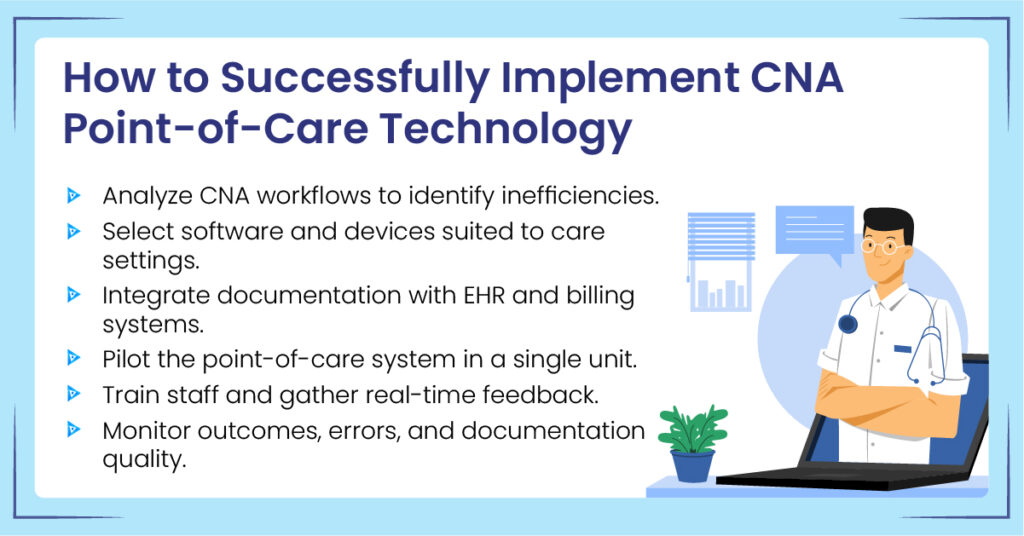
Step #1: Find out where POC is needed in your building.
First, walk through the facility before you buy anything. Watch where your CNAs spend time and what slows them down. For example, are they writing notes by hand? Are they waiting in line for a computer? Map these “traffic jams.” That gives you a clear view of where the new tools will help most.
Step #2: Pick the right equipment.
Once you know where the team struggles, you can choose tools to fix it. Some nursing homes just add a “CNA app” to their current systems. Others buy software built for long-term care. You also need to choose devices. Many facilities use a mix. They put tablets at the bedside so CNAs can move around. They also add wall-mounted screens in the halls for quick checks.
Step #3: Connect the systems.
This is the key technical step. For example, say a CNA records a blood pressure reading on a bedside tablet. That reading should flow into the central system on its own. As a result, no one has to type the same data twice. The billing team also gets what it needs to process claims on time.
Step #4: Test it out with a pilot program.
Do not roll the tools out to the whole building on day one. Instead, pick a small team or a single wing to try it first. Train those users well. Then let them work with the tools for a while before a full launch. Pilot users often catch small problems. For instance, a font may be too small, or a button may sit in an odd spot. Fix these early, and you avoid bigger problems later.
Step #5: Track progress.
After launch, keep measuring results. That way, you can be sure the tools are working. Useful questions to ask include:
- Are charting errors going down?
- Are insurance claims moving faster?
- Are claim denials dropping?
If these numbers move the right way, the POC rollout is a success.
How POC Skills Apply to CNA Certification Exams
“Point of Care” may sound like tech jargon. In reality, POC systems just swap the old skills test for a digital one.
Think about it this way. Whether you chart on paper or tell a proctor what you did, the core work is the same. You still turn patients, help them dress, help them eat, and take their vitals. The only change is the last step. Instead of writing it down, you tap a screen to record it.
Every state-approved training program teaches two things at once. First, you learn hands-on patient care. Second, you learn to chart it well. So moving from a paper chart in class to a tablet in a nursing home is a small jump. The hard part is learning the care. The easy part is tapping the screen to prove you did it.
How Much Does Point of Care CNA Technology Cost?
The cost of POC CNA technology comes from two main places. The first is software subscriptions. The second is start-up costs, such as training, setup, and sometimes devices. Here is how those pieces break down.
- Software subscriptions. Most facilities treat the software like a subscription. The price is usually set per bed, per day. A Forrester study commissioned by PointClickCare used an example of about $0.85 to $0.95 per bed each day. That comes to roughly $26 to $29 per bed each month. So a 100-bed facility would budget at least $2,600 to $2,900 a month for software alone. Keep in mind that real prices vary by vendor and contract.
- Start-up costs. On top of the subscription, expect one-time costs. These cover setup and the first round of staff training. The amount depends on your facility size and how complex the setup is. For larger facilities, these costs can reach the tens of thousands of dollars in year one.
- Hardware and equipment. Finally, plan for the devices. Some teams share tablets. Others install wall-mounted units in each room or hall. As a rough guide, an entry-level iPad starts around $349. Tablet wall-mount cases often run from about $200 to $300. Vital-signs monitors add more, based on the devices you pick.
What Is Next: AI at the Point of Care in 2026
Looking ahead, one shift gets the most attention. It is ambient AI. These are voice tools that listen during care and turn the talk into structured notes in the background.
The interest is easy to understand. A 2025 study in JMIR Nursing found that nurses spend about a third of a 12-hour shift just charting in flowsheets. That is before notes and handoffs are even counted. Early projects aim to ease this load. For example, a nurse-designed ambient documentation project at Mayo Clinic wants to free staff to watch the patient, not the keyboard. In the same vein, a 2026 study in the Journal of Medical Internet Research tested an AI speech assistant in long-term care. It reported much lower charting time and better efficiency.
For CNAs, these tools are still new. They will not replace careful charting any time soon. Even so, the direction is clear. Charting is moving closer to the bedside, and it is getting easier to capture in the moment. As a result, strong point-of-care habits matter more than ever. Keep your notes accurate, real-time, and complete.